The Complete Guide to AWS API Gateway Rate Limiting & Throttling (2026)
Master AWS API Gateway throttling, the Token Bucket algorithm, and Usage Plans — plus when to build a custom Redis-backed rate limiter.
Imagine you launch a new feature and one enthusiastic user writes a script that accidentally hammers your API with 5,000 requests per second. Suddenly, your database spikes to 100% CPU, and all your other users get error messages.
This is the "Noisy Neighbor" problem, and it's exactly what Rate Limiting and Throttling are designed to prevent.
In this guide, we will master AWS API Gateway’s native throttling features, understand the confusing "Token Bucket" algorithm, and look at when you need to move beyond the defaults to a custom solution.
Throttling vs. Rate Limiting: What’s the Difference?
Before diving in, let's clarify the terminology, as AWS uses them somewhat interchangeably:
- Throttling: Slowing down traffic that exceeds a specific threshold to protect your backend. If you send too many requests, you get a
429 Too Many Requestserror. - Rate Limiting: A broader term often used to describe the business logic of capping usage (e.g., "Free tier users get 1,000 requests/day").
How AWS Throttling Works: The Token Bucket Algorithm
AWS API Gateway uses the Token Bucket Algorithm to measure usage. It’s crucial to understand this because it explains why your API might accept 1,000 requests in one second but fail in the next.
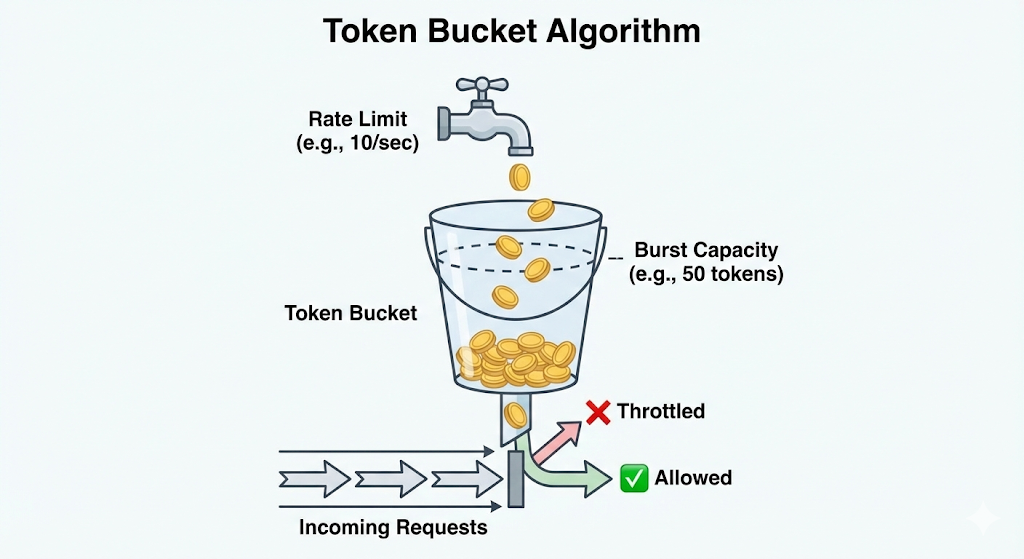
Imagine a bucket:
- The Burst Limit (Bucket Size): The bucket can hold a maximum number of tokens (e.g., 5,000). This is your "Burst" limit. It determines how many simultaneous requests you can handle instantly.
- The Rate Limit (Refill Speed): Every second, new tokens are added to the bucket at a specific rate (e.g., 10,000 per second). This is your "Rate" limit (Steady State).
The Rule: Every API request costs 1 token. If the bucket is empty, the request is rejected (Throttled).
- Key Takeaway: Burst allows for sudden spikes, while Rate determines your sustained throughput.
The Hierarchy of Limits: Who Gets Blocked?
AWS applies limits in a specific order. If a request violates any of these, it gets blocked.
- Account Level (Region Wide):
- By default, your AWS account is limited to 10,000 requests per second (RPS) across all your APIs in a specific region.
- Warning: If one API consumes this entire quota, your other APIs in the same region will stop working.
- Stage Level:
- You can set limits for a specific deployment stage (e.g.,
dev,staging,prod). This protects your Production environment from a load test running in Dev.
- You can set limits for a specific deployment stage (e.g.,
- Method Level:
- You can throttle specific routes. For example, you might allow 1,000 RPS on
GET /products(cheap to cache) but only 50 RPS onPOST /checkout(expensive to process).
- You can throttle specific routes. For example, you might allow 1,000 RPS on
- Client Level (Usage Plans):
- Limits applied to a specific API Key.
How to Implement Per-User Limits (Usage Plans)
If you want to monetize your API or prevent a single user from crashing your system, you need Usage Plans.
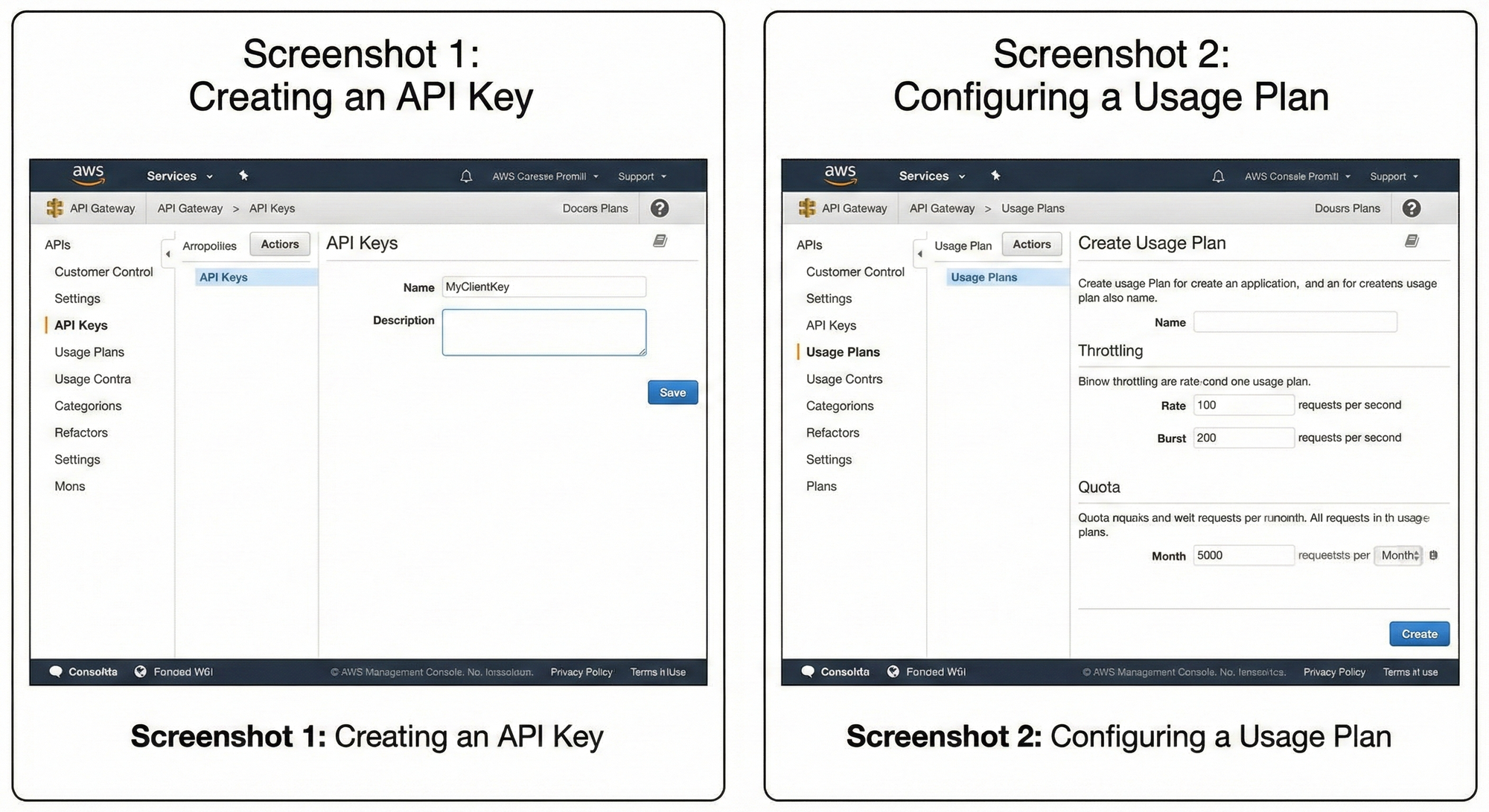
Step 1: Create an API Key
- Go to the API Gateway Console -> API Keys -> Create API Key.
- Give this key to your client. They must send it in the
x-api-keyheader of every request.
Step 2: Create a Usage Plan
- Go to Usage Plans -> Create Usage Plan.
- Set your Throttling limits (Rate: 100, Burst: 200).
- Set your Quota limits (e.g., 5,000 requests per month).
Step 3: Connect Them
- Add your API Stage to the Usage Plan.
- Add the API Key to the Usage Plan.
Now, requests with that API key are limited specifically to the rules you defined.
The "Gap": When Native Features Aren't Enough
Native Usage Plans are great for basic needs, but they have major limitations:
- API Key Only: You can only limit based on an AWS-generated API Key. You cannot rate limit by IP address, User ID (from a JWT), or Tenant ID natively.
- Propagation Delay: Changes to Usage Plans can take seconds or minutes to propagate.
- Global Counters: AWS uses "best effort" consistency for distributed counters, which might not be accurate enough for strict financial transactions.
The Solution:
For advanced use cases—like limiting a user based on their specific plan stored in your database, or creating dynamic "Sliding Window" limits—you need a custom solution.
Read the Advanced Guide: I have written a detailed breakdown on how to build a high-performance, atomic rate limiter using Redis and Lambda. Check out Customized Rate Limiting with AWS API Gateway & Elasticache for the code and architecture.
Alternative: Serverless API Gateway
If you are looking for a completely different approach that handles rate limiting at the Edge (closer to your users) rather than in a specific region, you might explore Serverless API Gateway. Unlike AWS's regional model, it leverages Cloudflare Workers to distribute your gateway globally, which can offer lower latency and simpler "per-IP" throttling configurations out of the box.
Troubleshooting API Gateway Errors
When limits are hit, things break. Here is how to diagnose the most common errors.
1. 429 Too Many Requests (Limit Exceeded)
- Cause: The client is sending requests faster than the configured Rate or Burst allows.
- Fix:
- Check CloudWatch metrics for
4XXError. - Implement Exponential Backoff in your client (retry after 1s, then 2s, then 4s).
- Request a Quota Increase if your legitimate traffic exceeds 10,000 RPS.
- Check CloudWatch metrics for
2. 504 Gateway Timeout
- Cause: Your backend (Lambda/HTTP) took longer than 29 seconds to respond. API Gateway has a hard 29-second timeout that cannot be increased.
- Fix: Optimize your backend code or switch to an asynchronous pattern (e.g., API Gateway -> SQS -> Lambda).
3. The "Phantom" 429 Error
- Scenario: You set a Usage Plan of 5,000 RPS, but users get throttled at 2,000 RPS.
- Cause: The Method Level throttling (set on the Stage settings) is overriding your Usage Plan. Or, your Account Level limit is being exhausted by other APIs in your account.
- Fix: Check the "Throttling" tab in your Stage Editor and ensure it isn't set lower than your Usage Plan.
4. CORS Errors on 429 Responses
- Scenario: Your client throws a generic "Network Error" or CORS issue instead of a 429.
- Cause: When API Gateway blocks a request (429), it often doesn't add the
Access-Control-Allow-Originheaders by default because the request never reached your backend. - Fix: You must configure "Gateway Responses" for Default 4XX errors in the API Gateway console to include CORS headers.
Frequently Asked Questions (FAQ)
Q: What is the default rate limit for AWS API Gateway?
A: By default, it is 10,000 requests per second (RPS) with a burst of 5,000 RPS per AWS Region per account. This can be raised by submitting a Service Quota Increase request.
Q: Does API Gateway charge for throttled requests?
A: No. If API Gateway blocks the request at the "throttling" layer, you are not charged for the API call or data transfer. However, if you use a Lambda Authorizer that runs before the throttle logic, you will be charged for the Lambda execution.
Q: Can I rate limit by IP address in API Gateway?
A: Not natively with Usage Plans. Usage Plans only support API Keys. To limit by IP, you must use AWS WAF (Web Application Firewall) attached to your API Gateway, or build a custom Lambda solution.
Q: Why is my Burst limit important?
A: Without a burst limit, your API would fail purely because two users hit "Enter" at the exact same millisecond. Burst provides a buffer (the bucket capacity) to queue and process concurrent requests without rejecting them immediately.
Q: What happens if I don't set a Usage Plan?
A: Your API will be open to the default Account-Level limits (10,000 RPS). A single malicious user could theoretically consume your entire account's capacity, causing a Denial of Service (DoS) for all your other applications.
Related writing
- 2021·03·08AWS Lambda — Container Image .NET Benchmark3 min
- 2025·12·28Comprehensive Study Guide for the AWS Certified AI Practitioner (AIF-C01) Examination9 min
- 2023·04·19What is AWS? A Comprehensive Introduction to Amazon4 min