Mastering Custom Rate Limiting: AWS API Gateway, Lambda & Redis (ElastiCache)
Build an atomic, high-performance rate limiter for AWS API Gateway using Go, Lambda, and Redis on ElastiCache — step by step with code.

TL;DR (Key Takeaways)
- The Problem: Native API Gateway throttling is often too rigid (server-side or per-key only) and lacks granularity for complex business logic.
- The Solution: Use a Lambda Authorizer backed by Amazon ElastiCache (Redis) to implement a custom "Fixed Window" counter.
- The Trick: Use Lua scripts to ensure atomic operations and Global Redis Clients to prevent connection exhaustion in AWS Lambda.
- The Result: A scalable, low-latency (<5ms) rate limiter that handles thousands of requests per second efficiently.
APIs are becoming the main product for many digital companies every day. We need to protect it in various ways. In most cases, API is an interface for a vast infrastructure behind it. When running our system on AWS, Amazon API Gateway would be our first choice in our infrastructure.
We need to consider many critical points for the security of an API Gateway, but I’ll tell you about rate limiting. Amazon API Gateway provides two basic types of throttling-related settings:
- Server-side throttling limits are applied across all clients.
- Per-client throttling limits are applied to clients based on API keys.
These two models of rate-limiting may not be what you need. You may need more customized solutions as we need in our products.
In our case with pixelserp.com needs different rate limits on different paths of API. Our users may send thousands of SERP requests per second, and this limit has to be different from other requests like webhook updates. We had to limit these separately. We decided to test it if we can manage to customize it with API GW and Elasticache.
Setup
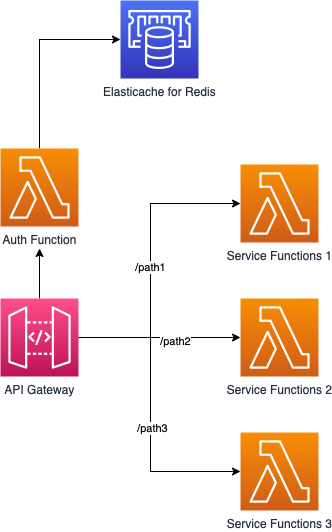
We have three services behind API Gateway, and we need to apply different rate limits for three additional services. So we need to count these request counts per path (or group of paths) per user per second. So we decided to test it with Amazon Elasticache for Redis.
Rate-limiting
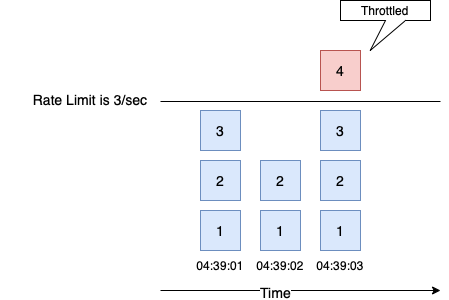
We plan to measure requests in a second-time window. As shown in the diagram, every second is isolated, and the counter starts from 0 in every new second.
Atomic Incremental
For counting, we need four main features:
- Atomic write (or increment) with reading
- Low latency
- Auto expire keys (TTL)
- Enough concurrent connection (min. 1000 connection)
Consequently, we found all in one, and that one is Redis. INCR Key provides atomic increment with returning the incremented value. INCR key also creates integer value with 0 initial value if it does not exist before. Atomicity is the most critical aspect of our design, and Redis provides it with the INCR key. We created a unique key based on second of time. This way, we would be able to separate seconds from each other.
userid_path_epochtime userid_groupname_epochtime
And we set TTL for a second if returning value is 1 with EXPIRE key so we won’t have to clear keys.
Test — 1
We created a test setup as follows.

var ctx = context.Background()
//Set Redis client
rdb = redis.NewClient(&redis.Options{
    Addr:     "go-redis-test-2.xxxxx.0001.use2.cache.amazonaws.com:6379",
    Password: "", // no password set
    DB:       0,  // use default DB
})

now := time.Now()
timestamp := now.Unix()
key := mt.Sprintf("userId_path_%d", timestamp)

val, err := rdb.Incr(ctx, key).Result() // Increment or create if not exists
if err != nil {
    panic(err)
}

if val == 1 { // This key has just been created if value is 1.
    rdb.Expire(ctx, key, time.Second)
}
We opened 100 concurrent connections with 100 goroutines. This created 500 requests/sec.
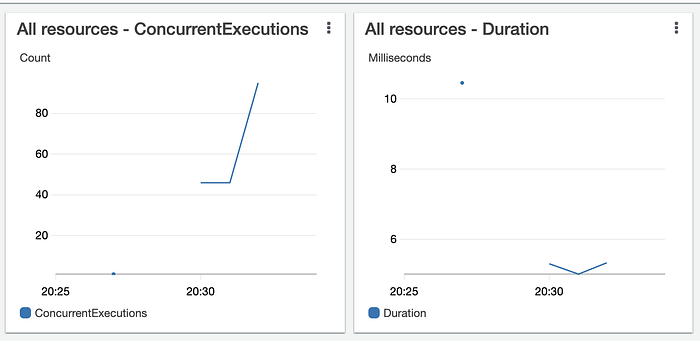
We reached 95 concurrent Lambda executions and an average 5.4 ms duration.
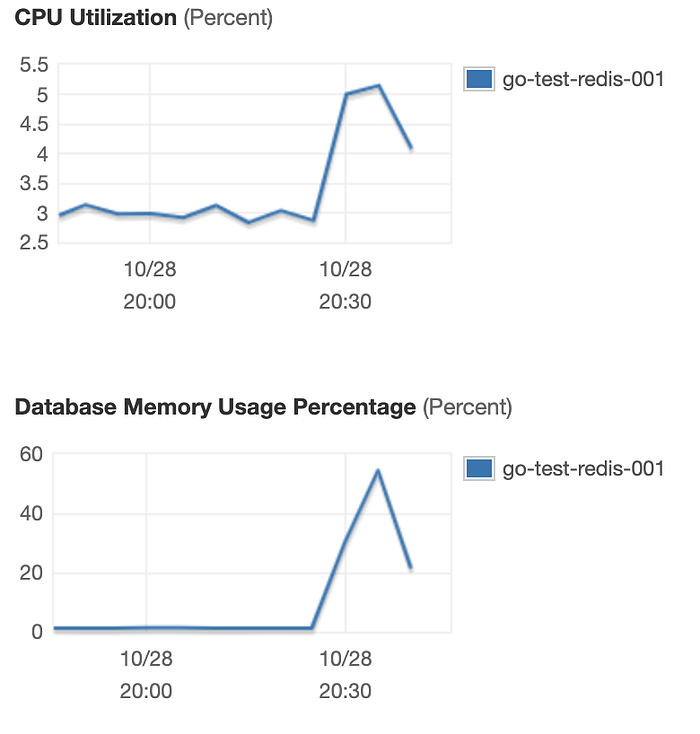
Elasticache had 5.5% CPU utilization and ~58% memory usage.
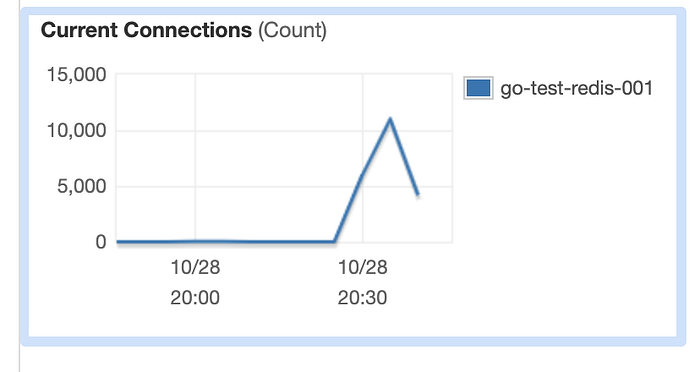
And Elasticache had reached 12503 concurrent connections. This is troubling because Elasticache has a hard limit on concurrent connection as 65000 and, it is also recommended that to not keep the connection count on that level for a long time.
So we thought that this high number of connections happened because we didn’t close the connection, and the Lambda environment doesn’t kill it either. So instead of killing the connection, we thought we could reuse the same connection with every new invocation of the same Lambda function because Lambda doesn’t destroy the environment immediately.
Test — 2
Before the second test we made two changes:
- Moved Redis client initialization to global.
- Resized Elasticache instance to cache.t3.small
var ctx = context.Background()
var rdb *redis.Client = nil

func Handler() (Response, error) {
    now := time.Now()
    timestamp := now.Unix()
    key := fmt.Sprintf("userId_path_%d", timestamp)
    if rdb == nil { //Create new client if it is null
        rdb = redis.NewClient(&redis.Options{
            Addr:     "go-redis-test-2.xxxxxx.0001.use2.cache.amazonaws.com:6379",
            Password: "", // no password set
            DB:       0,  // use default DB
        })
    }

    val, err := rdb.Incr(ctx, key).Result() // Increment or create if not exists
    if err != nil {
        panic(err)
    }

    if val == 1 { // This key has just been created if value is 1.
        rdb.Expire(ctx, key, time.Second)
    }

    return Response{
        Message: fmt.Sprintf("%s : %d", key, val),
    }, nil
}
We opened 100 concurrent connections with 100 goroutines. This created 600 requests/sec this time, and the duration is decreased to 1.6 ms. There were 100 concurrent Lambda functions as we expected but there was a significant difference in concurrent connections on Redis and memory usage.
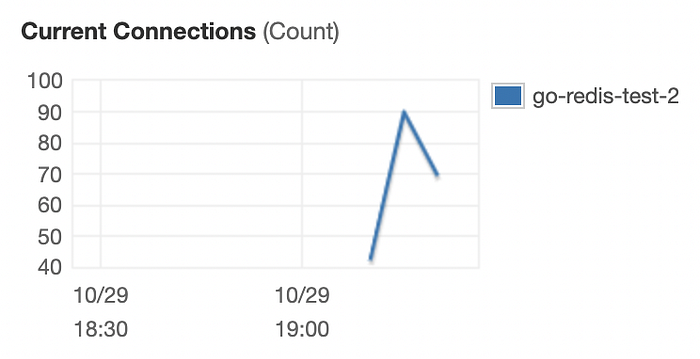
Concurrent connections were 100 as same as concurrent Lambda executions. That means global Redis clients worked, and every execution in the same environment used the same Redis client.
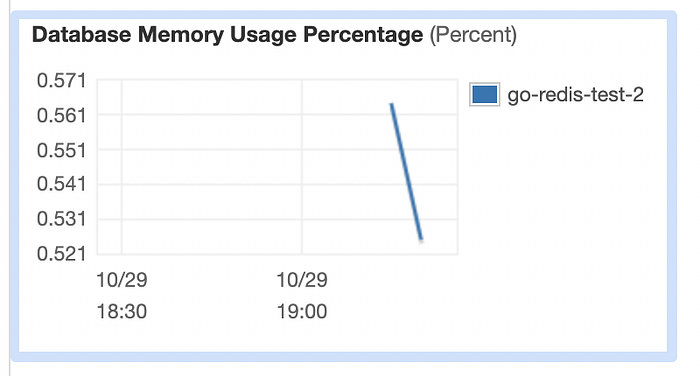
Memory size increased from 555 MB to 1555 MB with the new Elasticache instance. The first test had 58% memory usage. So it was 312 MB. In this test, it grew to 0.58% max. It was 9 MB. There has been a big difference, although it probably keeps the same data as the connections also take up memory space.
Summary
Thanks to the atomic incremental key, rate-limiting with Redis is working fine and has excellent scalability space. And it is cost could be as low as 11.2$.
There is still space for development. For example, we can test closing Redis clients and measure performance in the long run.
Frequently Asked Questions (FAQ)
Q: Why use Redis for rate limiting instead of API Gateway's built-in throttling?
A: API Gateway's native throttling is limited to "Token Bucket" algorithms applied either globally or per API Key. It cannot handle dynamic logic, such as "allow User A 50 req/s on /search but only 5 req/s on /login," or limits based on real-time database values. Redis provides the flexibility to create any logic you need.
Q: What is the best Redis data structure for rate limiting?
A: For simple "requests per second" limits, the Fixed Window counter (using INCR key) is the most memory-efficient. For stricter limiting that smooths out traffic bursts, the Sliding Window Log (using Sorted Sets) is better but consumes significantly more memory.
Q: How do I handle Redis connection limits in AWS Lambda?
A: Always initialize your Redis client outside your Lambda handler function (in the global scope). This allows Lambda to reuse the TCP connection across multiple invocations, preventing connection exhaustion on your Redis server.
Q: Does this add latency to my API?
A: Yes, but it is minimal. If your Lambda and ElastiCache are in the same VPC and Availability Zone, the network round-trip is typically under 2 milliseconds.